


More than 70% of recently implemented ERP initiatives fail to fully meet their original business use-case goals, and as many as 25% fail catastrophically, according to Gartner's ERP overview. That should change the opening question in every boardroom. The issue isn't just which ERP platform to buy. It's whether the business can absorb the operating-model change, fund the data work, and turn the system into measurable cash, control, and margin improvements after go-live.
ERP implementation is often sold as a software project with a cheerful timeline and a suspiciously clean demo. In practice, it changes how finance closes, how sales invoices, how operations plans, how purchasing approves spend, and how leaders make decisions. The software is only the machinery. The difficult work is deciding what the company should do differently, then getting people to do it consistently.
ERP failure doesn't usually begin with a broken interface. It begins when executives approve a budget without agreeing on the processes that must change. Industry summaries commonly place ERP project failure rates between 55% and 75%, with some analyses citing 68% overall failure and 73% in discrete manufacturing. Those figures are summarized in ERP implementation failure-rate analysis, and they explain why implementation discipline matters more than vendor enthusiasm.
The four pre-mortem causes are painfully repeatable:
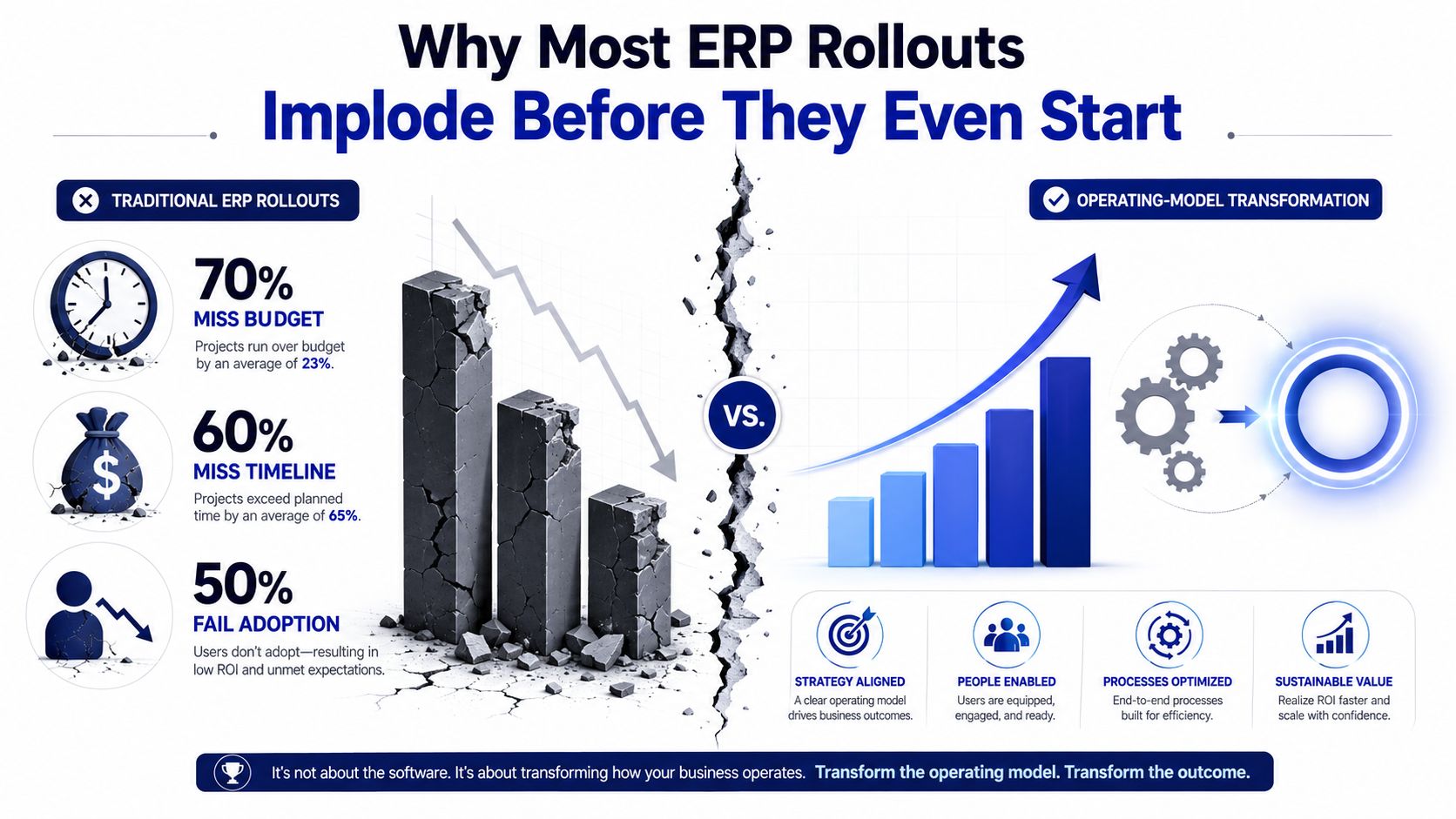
In 2026, the sensible question isn't which logo ends up on the server. It's whether the finance function can operate the new system once consultants leave. The 2026 ERP Report from Panorama Consulting Group highlights pressure from cost overruns, schedule overruns, and demands for faster time-to-value. The same verified summary notes that 63% of respondents saw increased cloud infrastructure and deployment costs, while 50% couldn't create a value proposition for SAP S/4HANA.
That's the uncomfortable economics. Subscription fees are visible. Internal labor, process disruption, integration maintenance, adoption risk, and stranded transformation spend are easier to hide. Approve the project only after naming the outcomes, owners, baseline measures, and post-go-live operating burden.
Operator rule: If leadership can't explain which decisions the ERP will improve and how finance will measure that improvement, the company isn't ready to buy software.
A workable implementation sequence has seven phases. The phases overlap, but each needs a gate where leaders decide whether the evidence supports moving forward. Calendar progress isn't proof of readiness. A signed checklist isn't proof either.
Start with current-state process maps, pain points, decision rights, integrations, and measurable outcomes. The practical source ERP implementation best practices from ERP Research gives discovery and planning a typical block of 4–8 weeks. Don't rush this because the vendor wants a signature. A weak discovery phase turns every later disagreement into a change request.
Decide how purchasing, order-to-cash, record-to-report, inventory, projects, and reporting should work. Teams often underestimate the effort. The ERP can expose bad handoffs, duplicate approvals, and unofficial spreadsheet systems, but it can't decide which compromises the business will accept.
Select against documented scenarios, not feature-count theatre. Run the ugliest process through every finalist, including exceptions, approval failures, partial shipments, returns, tax complications, and integration breaks. A useful SME perspective is available in F1Group's ERP guide for SMEs.
Configure standard workflows first. Customise only when the business case is stronger than the long-term maintenance cost. ERP Research assigns 8–16 weeks to design and configuration, but the schedule depends on decision speed, integration mapping, and the number of unresolved process choices.
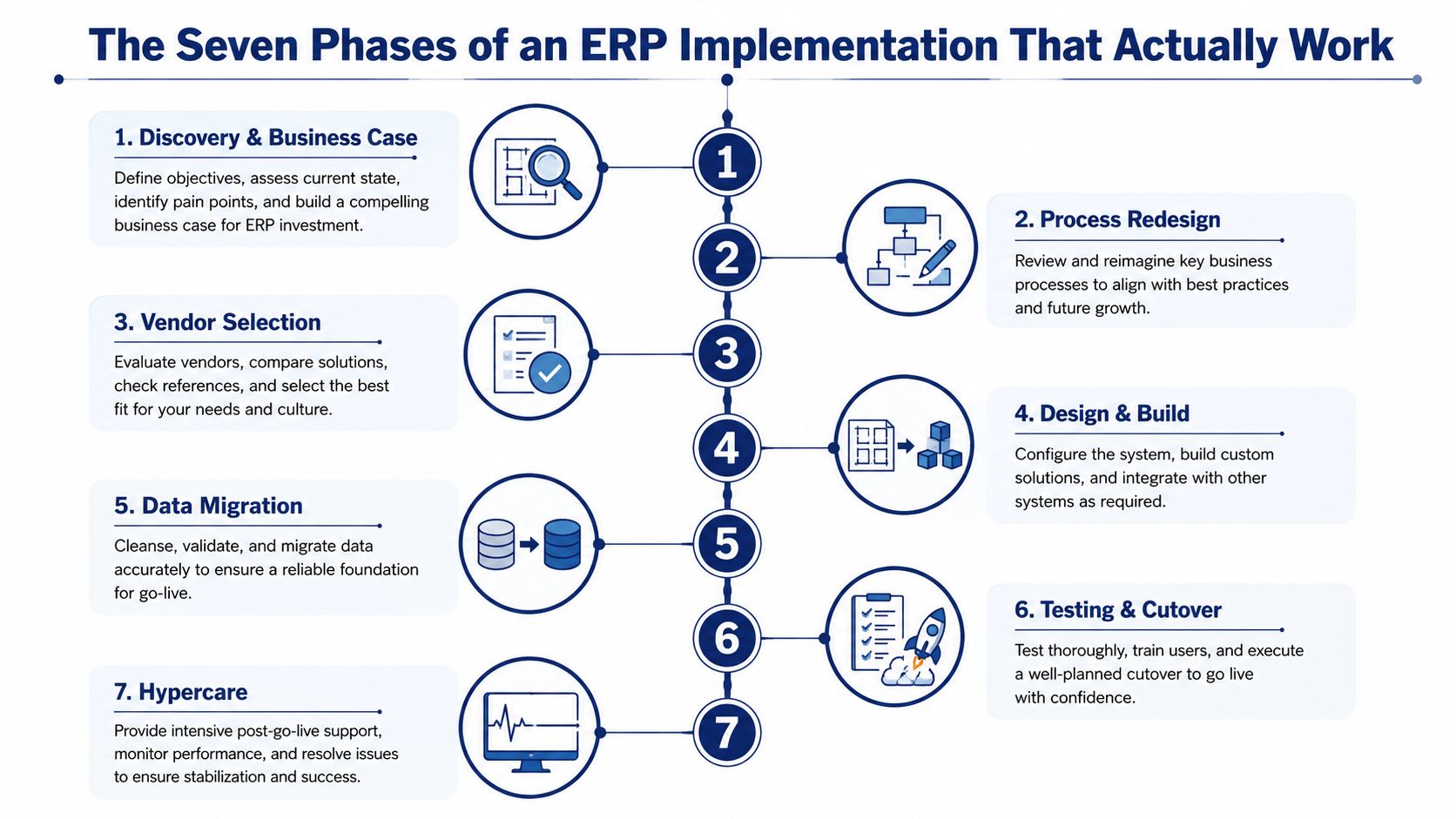
Cleanse, map, convert, validate, and reconcile data before pretending the project is on schedule. ERP Research lists 8–20 weeks for migration. Treat that as a serious workstream, not a late technical task.
Functional testing isn't enough. Test integrations, security roles, reporting, exceptions, month-end procedures, and the actual work users perform. The source gives testing a typical 4–8 week block. User acceptance testing deserves its own decision gate because users are the people who'll discover whether the design works outside the conference room.
Go-live support typically lasts 2–6 weeks in the ERP Research sequence. Hypercare should stabilise critical workflows, resolve defects, monitor adoption, and identify process bottlenecks. It shouldn't become a permanent emergency room staffed by consultants.
The same source describes additional typical blocks of 6–12 weeks for selection and 4–8 weeks for training and change management. Teams compress these phases under pressure, then act surprised when risk accumulates. That's how “next quarter” becomes a very expensive office legend.
Cloud versus on-premise isn't a morality contest. It's a deployment decision shaped by five-year total cost of ownership, integration footprint, regulatory exposure, internal IT maturity, and upgrade frequency.
Cloud ERP usually shifts spending toward recurring subscriptions, vendor-managed infrastructure, and ongoing deployment costs. On-premise ERP can provide deeper control for organisations with demanding regulatory or security requirements, but the company carries more responsibility for infrastructure, maintenance, upgrades, and internal expertise. Hybrid architecture may preserve selected legacy investments while moving core workflows elsewhere. None of these choices is automatically cheaper.
A scripted demo is theatre. Vendors show the clean path because the clean path sells. Demand a live sandbox or realistic working session using your own scenarios. Include the process everyone avoids discussing, such as a disputed invoice, an incomplete shipment, a failed approval, a foreign-currency adjustment, or a reconciliation that doesn't tie.
Score the vendor and implementation partner separately. A strong product with a weak partner can still produce a bruising rollout. Pricing also needs forensic attention. Check per-user tiers, integration licences, storage, environments, support levels, overage fees, renewal terms, and the cost of extracting your data if you leave.
| Criterion | Weight | What to Verify |
|---|---|---|
| Industry fit | High | Relevant workflows, compliance needs, and operating complexity |
| Similar reference customers | High | Comparable size, transaction profile, modules, and implementation partner |
| Partner ecosystem | High | Named consultants, certifications, availability, and escalation path |
| Integration footprint | High | APIs, middleware, licence requirements, monitoring, and ownership |
| Contract flexibility | Medium | Renewal mechanics, user changes, module additions, and termination rights |
| Exit cost | High | Data export, retention, transition support, and replacement dependencies |
| Pricing transparency | High | User tiers, integration charges, overages, support, and upgrade costs |
For finance teams still comparing tools, this accounting software guide for small businesses offers useful context on evaluating software around business needs rather than shiny feature lists. The same discipline applies here, only with more zeros and more meetings.
Vendor test: Score every finalist on the process that makes your operations team sigh. If the demo avoids it, the contract won't fix it.
Data migration fails when companies treat “data” as one big technical bucket. Split it into two streams immediately, with separate owners, validation rules, and rehearsal plans.
Master data includes customers, vendors, items, charts of accounts, and employees. It defines the records that transactions rely on. Transactional data includes open accounts receivable and accounts payable, work in progress, inventory, and project activity. Transactional conversion depends on accurate master data, so moving both streams together without reconciliation is an excellent way to create a new system with old problems.
The effort is not evenly distributed. The verified implementation summary from Flectic's ERP statistics and success-rate analysis identifies data migration problems in 41% of timeline overruns, while scope creep accounts for 40% and inexperienced project teams appear in 35% of failures. Those figures aren't a licence to invent a universal effort split. They are a warning to fund migration as a business workstream, not a weekend export.
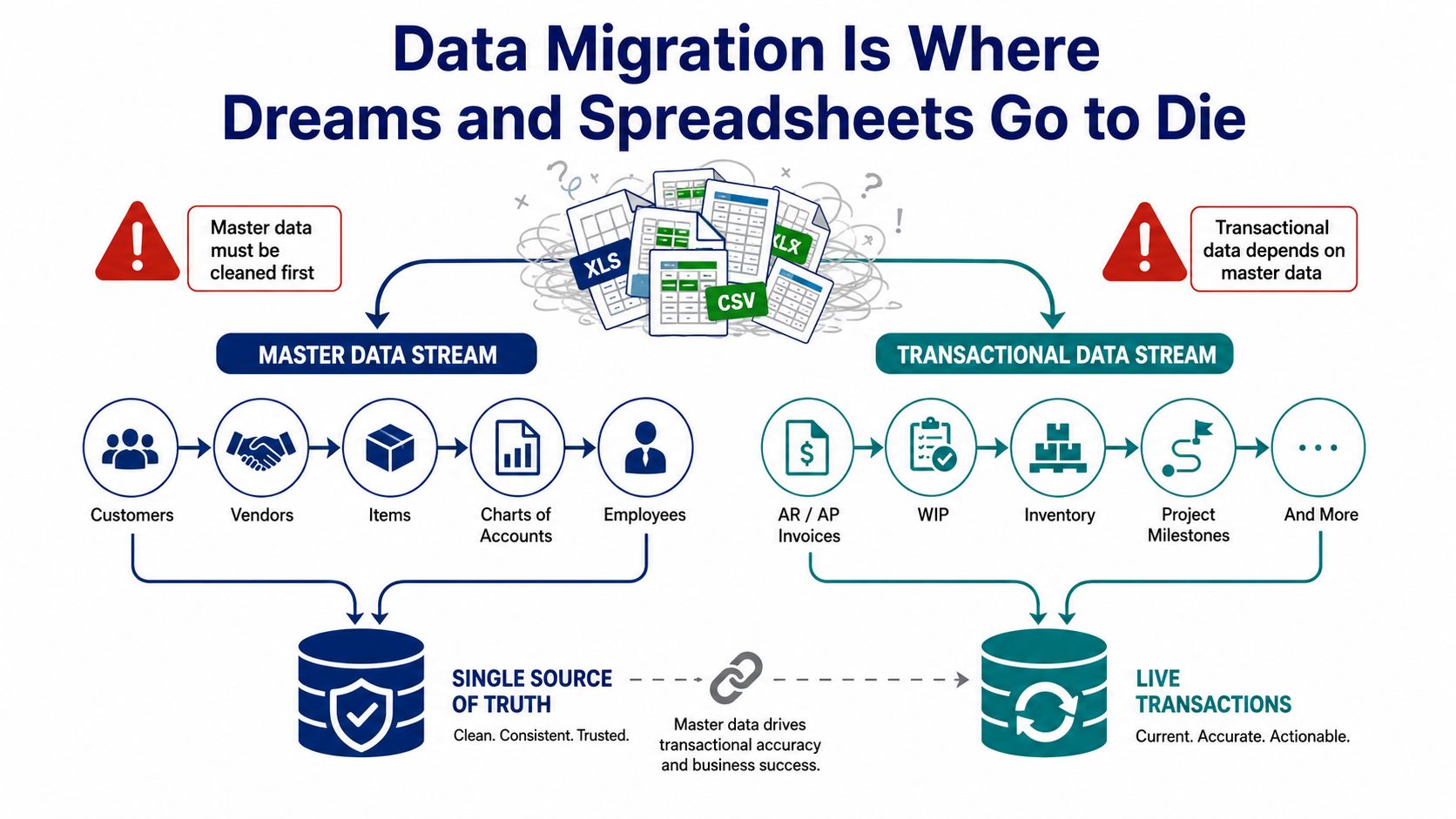
IT can build conversion routines. IT shouldn't own the meaning of a duplicate customer, obsolete item, invalid tax code, or suspicious vendor record. Functional owners should approve cleansing rules and sign off on the results. Finance owns the chart of accounts and open balances. Operations owns items and inventory logic. Procurement owns vendors. Sales or customer operations owns customer records.
Rehearse mock conversions and reconcile them against source totals. Validate record counts, balances, status fields, dimensions, currencies, inventory quantities, and downstream reports. A bad customer master can surface later as invoicing errors, credit-limit breaches, and disputes that nobody connects back to migration.
The accounting software integration guide is useful when assigning responsibility for finance workflows that cross system boundaries. Integration ownership belongs with the people accountable for the financial result, not just the person who configured the connector.
Data rule: IT moves the records. Functional owners decide whether the records deserve to move.
User acceptance testing isn't a polite product tour. It's the final argument over whether the configured ERP supports real work. Treat it as a stage gate with three freezes: configuration freeze, data freeze, and process freeze. Each freeze needs a written exit criterion, an owner, and a list of exceptions that require executive approval.
Build a scenario matrix for every core process. Include at least one happy path, one exception path, and one integration path. A finance test might cover a normal customer invoice, a disputed invoice, and the transfer into the general ledger. A supply-chain test might cover a standard receipt, a partial receipt, and an inventory update that flows into planning and reporting.
Run cutover as a 72-hour controlled burn, not a dramatic midnight switch. Use the first period for a dry run, the next for reconciliation and issue correction, and the final period for the formal go or no-go decision. Leadership may say there's no turning back. Write the rollback decision tree anyway. Documenting the conditions forces the team to define what failure looks like before everyone is tired and defensive.
| Stage Gate | Owner | Exit Criterion | Rollover Status |
|---|---|---|---|
| Configuration freeze | Solution lead | Approved configuration inventory, no unreviewed changes | Open defects assigned |
| Data freeze | Data lead and finance owner | Converted balances and key records reconcile to approved thresholds | Exceptions documented |
| Process freeze | Business process owners | UAT scenarios pass, including exception and integration paths | Training materials final |
| Cutover rehearsal | Cutover manager | Runbook completed, timings recorded, dependencies confirmed | Issues retested |
| Go or no-go | Executive sponsor | Evidence reviewed, risks accepted, rollback path documented | Decision recorded |
| Hypercare handoff | Product owner | Critical incidents have owners and escalation routes | Support cadence active |
The point isn't to destroy the old system theatrically. It's to control the destruction of old workflows, duplicate data, and informal workarounds before they destroy your close.
Adoption is the make-or-break variable. One study identifies six adoption influences: trust, communication and engagement, system qualities, training, organisational benefits, and resistance, as documented in the Brunel University research record. That list is more useful than another feature comparison because technically correct software still fails when employees don't trust it or understand why their work changed.
Leadership gets six practical levers.
Name an executive sponsor with weekly airtime. The sponsor must make decisions, remove blockers, and explain why the operating model is changing. A logo in the project charter isn't sponsorship.
Build a super-user network. Choose respected operators, not the most senior employees. They should test workflows, coach peers, capture recurring issues, and challenge the project team when a design ignores reality.
Train by role and task. Accounts payable staff need to practise invoice exceptions. Sales operations needs to handle orders, credits, and returns. Generic slide decks produce attendance records, not competence.
Run shadow operations after launch. Keep a controlled comparison between old and new outputs where risk justifies it. This helps teams identify reconciliation breaks before they become board-level surprises.
Operate a hypercare war room. Give incidents clear severity levels, owners, escalation routes, and response expectations. A support channel without triage is just a crowded inbox.
Track behaviour, not only tickets. Monitor logins, workflow completion, approval patterns, spreadsheet workarounds, reporting use, and recurring manual adjustments. Issue counts alone can look healthy while users abandon the system.
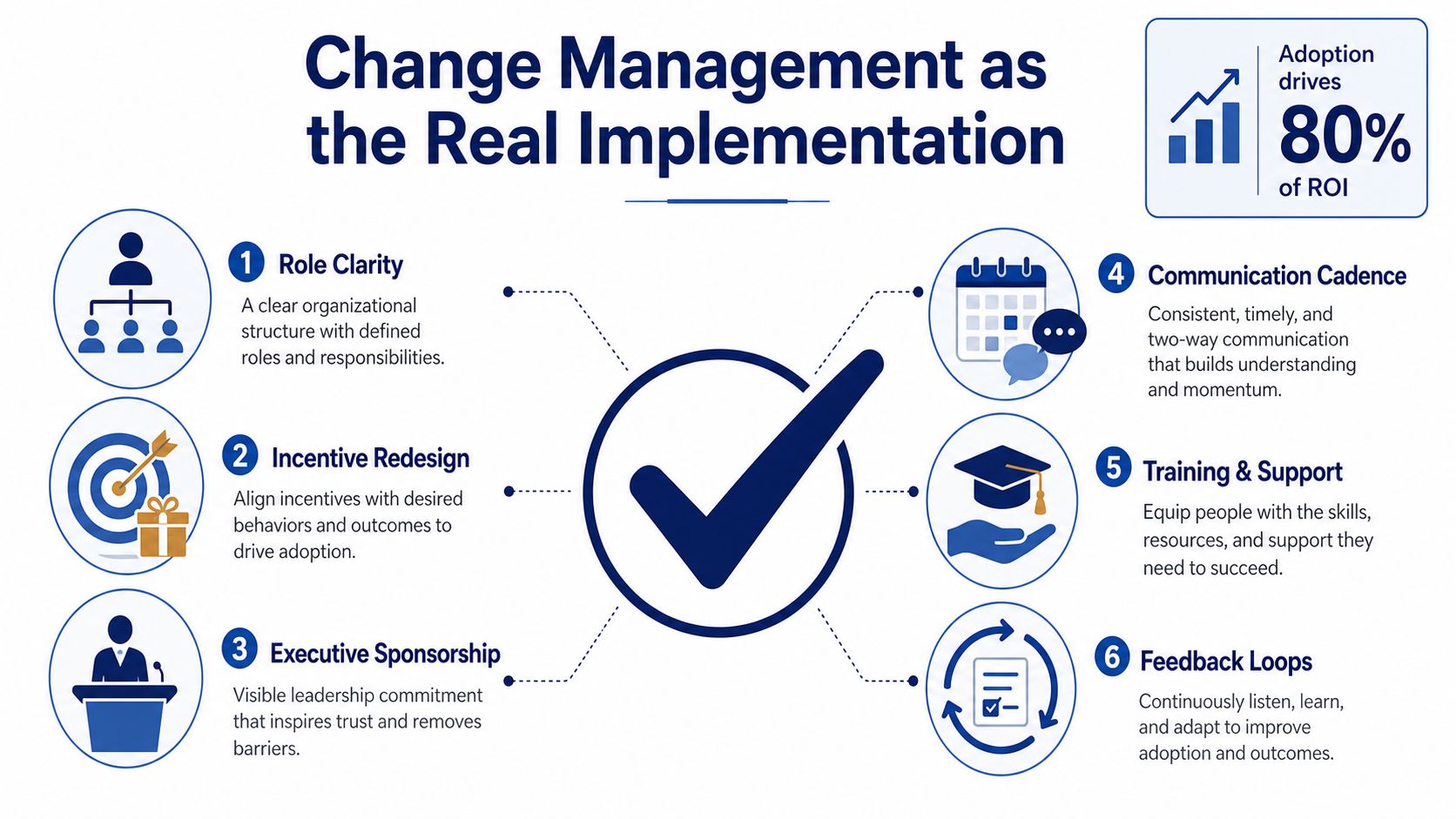
The common traps are familiar: death-by-PowerPoint training, champions appointed by seniority instead of influence, and communications that announce a launch date without explaining the business reason. People don't resist change because they enjoy inefficient work. They resist ambiguity, lost control, unclear incentives, and systems that make their day harder.
Research summarised in a recent change-management study connects sustainable implementation with managerial support, employee engagement, infrastructure alignment, proactive risk management, strategic alignment, and sufficient resources. Use those principles to connect ERP behaviours to team goals. For a practical framework on integrating OKRs with change management, translate system adoption into observable outcomes rather than vague enthusiasm.
Adoption reality: Employees don't need another motivational speech. They need a usable process, a reason to trust it, and someone accountable for fixing the friction.
Go-live is the first credible test, not the finish line. Start with a 30-60-90-day stabilisation plan that assigns owners to open defects, integration errors, workflow bottlenecks, access requests, and reconciliation breaks. Keep hypercare focused. If every issue remains “urgent” forever, the team loses the ability to distinguish a nuisance from a financial-control risk.
Finance should rebuild the business case using actual results. Include implementation and subscription costs, internal labour, avoided legacy-system spending, working-capital effects, inventory changes, close-time improvements, labour productivity, and adoption-related risk. Separate cash savings from accounting entries. Separate productivity claims from verified headcount reductions. “The team feels faster” may be useful feedback, but it isn't a realised benefit until someone defines the measure.
Every promised outcome needs an owner, baseline, target, measurement method, and review date. Review the register monthly for six months, then quarterly. The CFO should ask whether each benefit has appeared in cash, control, capacity, cycle time, or decision quality. If it hasn't, record the reason rather than moving the goalposts.
| Measure | Baseline | Post-go-live target | Actual | Owner / review cadence |
|---|---|---|---|---|
| Close speed | Document before launch | Approved finance target | Recorded after each close | Controller, monthly |
| Inventory accuracy | Validated pre-launch measure | Approved operations target | Reconciled result | Operations lead, monthly |
| Reporting quality | Known error and rework profile | Defined quality standard | Exception review | FP&A lead, monthly |
| Process cycle time | Current-state timing | Future-state target | Workflow measurement | Process owner, monthly |
| Integration reliability | Pre-launch failure record | Accepted service threshold | Incident and reconciliation log | IT and finance, monthly |
| User adoption | Role-based usage baseline | Agreed usage behaviour | Usage and workaround review | Change lead, monthly |
A permanent product owner must govern releases, master data, access controls, integrations, security, and vendor performance. Revisit customisations once the system stabilises. Configuration debt is cheaper to clean up while the team still remembers why it existed.
Finance leadership may need additional capacity during this period. HireAccountants provides access to pre-vetted accountants and finance professionals, including support relevant to finance migration and integration work, through fractional CFO services. That kind of flexible support can help a business maintain core finance operations while its own leaders manage the new operating model.
The broader market context matters. Industry summaries estimate that the global ERP software market is nearing $50 billion annually by 2026, and cloud systems power roughly 70% of ERP deployments, according to ERP statistics and market milestones. Those figures describe adoption, not value. A modern deployment still fails economically if the company can't convert cleaner data and disciplined workflows into repeatable margin, cash, and control improvements.
The right CFO question is blunt: What changed in the economics of the business after go-live, and can we prove it? If the answer is unclear, the implementation isn't finished. It has merely stopped being a project and started becoming an operating problem.
HireAccountants helps companies add pre-vetted accountants and finance professionals for bookkeeping, FP&A, migration support, and ongoing ERP-related finance work, with flexible full-time or part-time arrangements. Visit HireAccountants to strengthen the finance capacity needed to reconcile data, measure ERP benefits, and keep the business running while the transformation settles.
Let's simplify your finances today!