


You're probably here because the books are getting messy, the dashboard looks prettier than the truth, and every vendor demo sounds suspiciously like it was designed by a magician in a blazer. Fair enough. Choosing accounting software isn't about falling for the cleanest interface, it's about picking the system your team can live in without torching cash, time, or morale.
The mistake I see all the time is simple. Founders buy software first, then discover their workflow doesn't fit it. That's how you end up with duplicate entries, weird workarounds, and a bookkeeper muttering at a spreadsheet at 9 p.m. Do the work map first, then shop. Anything else is how people end up mortgaging the office ping-pong table for “enterprise readiness.”
One more thing before we get into the weeds. The market is no longer tiny bookkeeping-app territory. One 2025 guide puts the global SMB accounting software market at USD 17.38 billion in 2024 and projects USD 31.76 billion by 2033 Rework guide. That growth is exactly why selection now has to be treated like infrastructure, not a cute admin purchase.
Most bad software decisions start with a demo. Someone sees a clean homepage, clicks around for ten minutes, and suddenly the company is “evaluating platforms.” That's backwards. You should start with the actual accounting work, because the right tool is the one that fits your mess, not the one with the best screenshots.
Keep it brutally practical. Split everything into must-have and nice-to-have, then force every stakeholder to agree that the nice-to-haves are just that, nice. Your brief should answer three questions: who touches the books, how money moves through the business, and which reports keep you awake at night.
If you want a solid reference point while you draft it, Alignmint's software guide is useful because it pushes the same discipline, start with workflow fit, then test the software against real needs. That's the right instinct.
Practical rule: if a feature doesn't change how you close the books, invoice customers, pay people, or review cash, it probably doesn't belong in your must-have list.
Here's the self-audit I'd use in an afternoon:
A slick dashboard can hide terrible workflows. If your business depends on bank feeds, payroll, or e-commerce reconciliation, those are not “features.” They're the entire point.
The best accounting software choice is rarely the one with the longest feature list. It's the one that matches your actual operating rhythm, your current team size, and the next layer of complexity you can already see coming. If you're a three-person startup, don't pay for a finance suite built for a bureaucratic swamp. If you're already managing multiple entities, don't buy a toy and call it prudent.
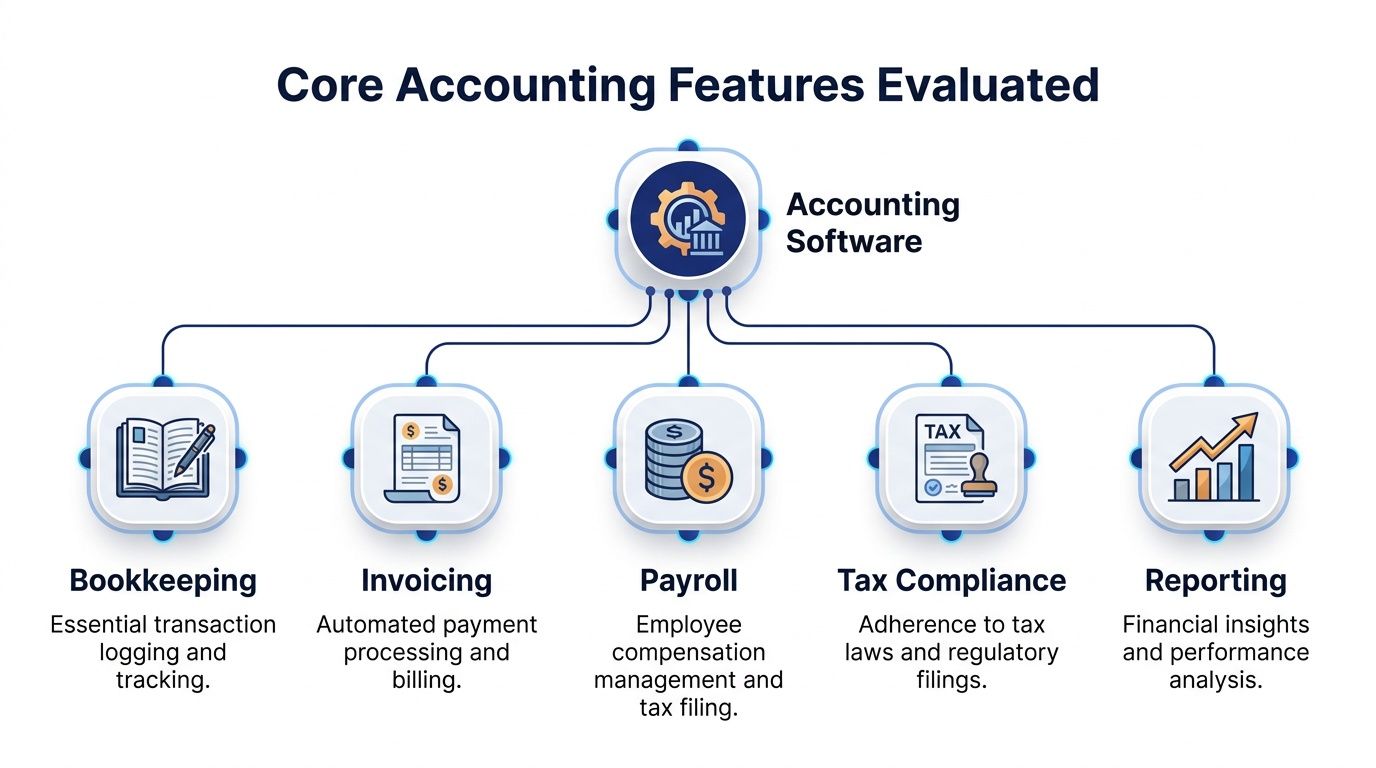
The core features vendors promote do not carry equal weight. Some are baseline requirements. Some are surface-level polish. Some create more work than they remove. If you are serious about how to choose accounting software, judge each pillar by the workflow it supports and the failure it prevents, not by the way it looks in a demo.
Basic bookkeeping automation should cut manual entry, make reconciliation easier, and keep transaction categories consistent. That is the job. If the platform cannot do that cleanly, it is failing before you even reach reporting.
Invoicing gets messy fast once you deal with partial payments, credits, multiple currencies, or recurring billing. A polished invoice screen does not mean much. Test whether your team can issue, track, and match payments without turning every Friday into forensic accounting.
Payroll is often oversold because it demos well. What matters is whether the system fits your payroll provider, tax process, and month-end close. If it does not, you are just moving the pain around.
Tax modules deserve the same skepticism. If you file across states, entities, or jurisdictions, the software has to support the way you operate. Otherwise, “tax support” becomes a polite label for extra cleanup work.
Capterra buyer insights says many prospective buyers prioritize financial reporting as the most important feature, while fewer current users rank it that way. That gap matters. Buyers shop for reporting because they know a clean ledger is only half the job. They stay happier when the reports help them run the business.
If your reporting stops at “good enough for tax time,” you will end up exporting data into spreadsheets anyway. That is not software, that is a very expensive staging area.
So here is the short version. Bookkeeping and reporting usually deserve the top slot. Invoicing matters more if you bill often or deal with edge cases. Payroll and tax features need to match your entity structure, not the sales pitch. Everything else is garnish.
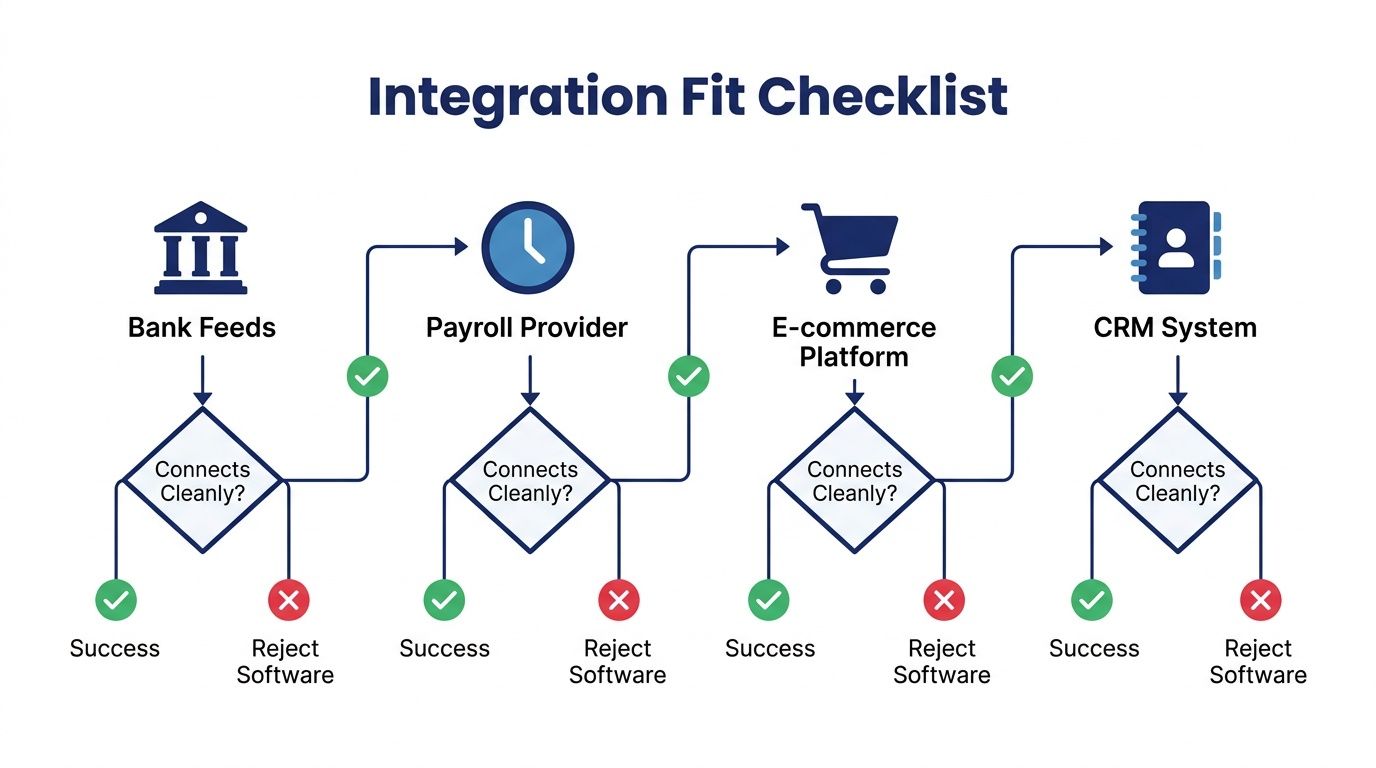
If your bank feed, payroll provider, e-commerce platform, or CRM doesn't connect cleanly, stop there. The software has already failed. Pretty dashboards don't fix broken data flow, they just make the mess look well-branded.
Start with the boring stuff. Bank accounts, payment processors, payroll, inventory, e-commerce, CRM, expense tools, and the spreadsheet your ops lead swears is temporary. If a connection is happening every day, it's tier one. If it's a monthly export, it still matters, but it's not the same level of pain.
Native integrations usually beat patchwork connectors for your most important systems. Zapier can be fine for one-off automations, but it's not where I'd put the crown jewels. The more your accounting stack depends on manual syncs, the more likely you are to spend your afternoons babysitting exceptions.
Use your actual data in the demo. Real customer names, real transaction types, real edge cases. Ask the vendor to show the path from bank feed to reconciliation, from payroll to journal entry, and from order platform to revenue recognition or invoice creation if that applies.
The key question isn't “does it connect?” It's “does it connect without creating cleanup work?” If the answer is no, reject the software and move on. No amount of product polish is worth building a future around bad plumbing.
If you want a deeper pass on what this looks like in practice, the integration guide at HireAccountants is worth a read because it focuses on the actual connection layer, not the brochure version.
Demos are theater. Useful theater, sure, but theater all the same. If you don't score vendors against a weighted model, you'll end up choosing the one with the smoothest presenter and the least awkward pause. That's not a process, that's a vibe.
Use a simple 1-to-5 scale. List your criteria, assign each one a weight from 1 to 5, score every vendor on the same scale, multiply weight by score, and total the results. That turns subjective opinions into something you can defend after the room cools down.
A structured selection process should include researching the market, prioritizing requirements, shortlisting vendors, evaluating demos, scoring systems, comparing price quotes, checking vendor viability, and reviewing the SLA. The reason this works is simple. It cuts through feature noise and makes the decision repeatable instead of emotional Software Advice selection guide.
My rule: if two people can watch the same demo and walk away with totally different winners, the scorecard isn't strict enough yet.
| Requirement | Weight | Vendor A | Vendor B | Vendor C |
|---|---|---|---|---|
| Reporting depth | 5 | 4 | 5 | 3 |
| Bank reconciliation | 5 | 5 | 3 | 4 |
| Payroll fit | 4 | 3 | 5 | 2 |
| Native integrations | 5 | 4 | 4 | 2 |
| SLA and support | 4 | 3 | 4 | 3 |
| Total cost over 24 months | 5 | 3 | 4 | 5 |
Don't score features alone. Score reference checks, SLA terms, and vendor viability right on the same sheet. A decent feature set from a shaky vendor is a future headache with a prettier logo.
If you're testing automation-heavy workflows, you can also look at a practical setup like set up QuickBooks AI with Cyndra as one comparison point. I'd treat any AI layer as an assistant, not a replacement for judgment. Toot, toot, because apparently we all need to say that out loud now.
The winner should be the vendor that scores well on your real requirements, not the one that dazzled the room for 20 minutes. That's how you buy software with a spine.
Sticker price is the bait. The bill shows up in user expansion, renewals, add-ons, accountant seats, payroll modules, tax modules, implementation, and migration. A cheap plan can become the most expensive decision in the first two years if it forces repeated upgrades and extra admin time.
One pricing guide says buyers should evaluate total cost over two to three years, not just the monthly sticker price, and notes that many buyers budget less than $100 per month. Capterra pricing guidance Solo founders see $29 per month. Add accountant seats, and the bill can jump fast before payroll even lands.
A second guide says the true budget has to include add-ons, extra users, payroll, tax reporting, implementation, and data migration, not just the base subscription Cloudvara guidance. That is the part vendors usually bury under the shiny pricing page.
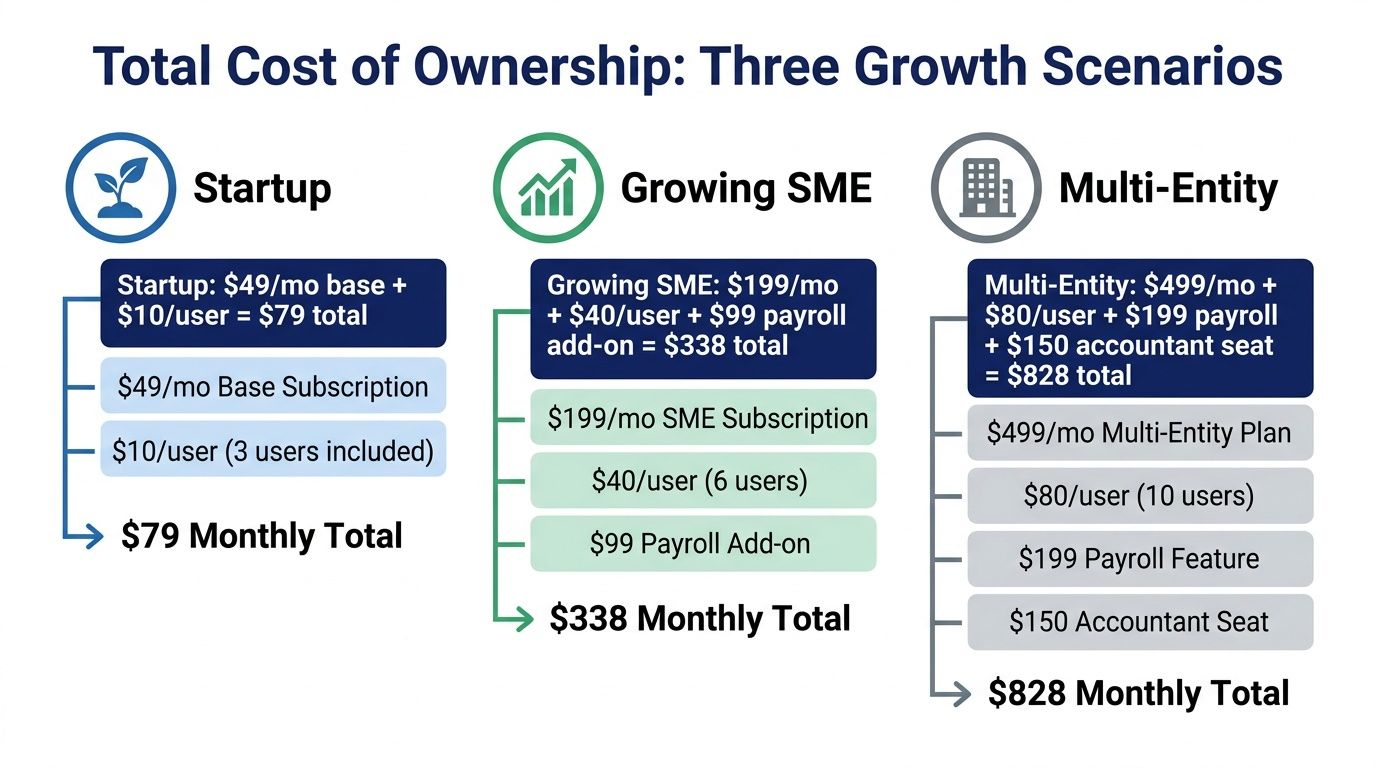
A selection guide also says to check whether accountant access is included or costs extra, and to test whether the platform still fits if the company crosses 50 employees or adds a second entity within 24 months Software Advice criteria guide. That is the kind of planning that keeps you from buying a system you will outgrow before the next lease renewal.
Price the software for the future you can already see. If you are likely to add users, move into payroll, or launch another entity, model those costs now and pair the software with the finance talent needed to run it cleanly. A lean tool without the right operator turns into an expensive mess.
Most software regrets show up on cutover day. That's when bad data, missing mappings, and lazy cleanup turn a clean purchase into a very expensive archaeology project. If you want to avoid that mess, treat migration as a controlled process, not a leap of faith.
Start by exporting historical data, then cleanse duplicates and inconsistencies. Map fields to the new chart of accounts, run a small test import, and reconcile trial balances in both systems before full cutover. That checkpoint matters more than the logo on the login page.
The point isn't to move every historic line item just because you can. Move what you need for operational continuity, compliance, and reporting, then leave the rest where it belongs if it's only going to create noise. The cleanest migration is often the one that resists the urge to import the entire past like it's a moral obligation.
A phased rollout helps. Run parallel books long enough to validate outputs, but not so long that everyone starts maintaining two worlds and losing the will to live. The goal is confidence, not heroics.
If you want a useful companion on the cleanup side, the reconciliation guide at HireAccountants is relevant because it reinforces what the checkpoint should look like before you trust the numbers. That's the moment when a lot of ugly issues finally become visible.
Practical rule: if your trial balance doesn't match in both systems, you do not have a software problem yet. You have a migration problem.
Once the data checks out, then you can flip the switch. Not before.
The software doesn't close the books. A human does. That's the part teams skip when they buy something “easy.” Easy software still needs someone who knows what normal looks like, and normal is doing a lot of work in finance.
A simple stack can work with a sharp bookkeeper. A more complex stack, especially one with reporting, integrations, or multi-entity needs, usually wants someone who can own controls and monthly close. If the software is smarter than the team running it, the result is usually not innovation. It's confusion with a subscription.
That's why software choice and finance hiring should be treated as one decision. If you're comparing platforms and still don't know who will run them, you're not done.
For teams filling that gap, how to hire a bookkeeper is a sensible starting point, and HireAccountants itself is one option for companies that want pre-vetted accounting talent rather than another software tab open in the browser. Sometimes the solution is human, not technical.
If you take one thing from this, take this. Buy the software for the workflow, then hire for the complexity it creates. That pairing is what keeps the whole thing from sliding into expensive improvisation.
If you want a faster path to the right mix of software, workflows, and finance support, visit HireAccountants. They help teams pair accounting talent with the systems they run, so you're not left duct-taping software onto a finance function that's already overloaded.
Let's simplify your finances today!