


Most advice on hiring a remote accounting assistant is weirdly obsessed with sourcing. Post the role. Screen resumes. Run interviews. Pick a winner. Toot, toot. Job done.
Nope.
That's how founders end up with a cheerful new hire and a broken close. The assistant isn't the problem. The system is. If your approvals are fuzzy, your chart of accounts is messy, your bank feed rules are half-baked, and nobody owns exception review, even a good hire will produce expensive nonsense.
A remote accounting assistant should sit inside a tight control loop, not a trust exercise. That means clean scope, explicit approvals, clear escalation, and repeatable workflows. If that sounds less exciting than “find top talent fast,” good. Finance is supposed to be boring. Boring is how you avoid discovering in month-end that Stripe was off by a few transactions since week two.
The popular framing says you have a recruiting problem. You probably don't. You have a process-control problem wearing a recruiting hat.
A remote accounting assistant is not a magician with a laptop. They're an operator inside your accounting system. If you hire before you define controls, you're basically handing someone access to your financial plumbing and hoping vibes will sort out the leaks. Vibes rarely reconcile cash.
Before you write a job post, answer these:
If you can't answer those in one page, you're not ready to hire. You're ready to create confusion remotely, which is somehow even more efficient than doing it in person.
Practical rule: If the assistant can touch money, code entries, or create vendors, you need thresholds, logs, and a reviewer before day one.
This control-first view isn't theory. Research on telecommuting in public accounting found that remote work can improve efficiency overall, but routine, well-documented work performs best, while training-heavy delegation and management efficiency slip first (public-accounting telecommuting research). That's exactly why remote accounting assistants shine in standardized work and struggle in chaotic environments.
A solid remote setup usually has these pieces:
The job isn't “find someone detail-oriented.” Everybody says they're detail-oriented. The job is building a workflow where detail failures surface quickly and cheaply.
That's also why the rest of the hiring process should be built backward from the close. You're not hiring for generic support. You're hiring for daily reconciliation, clean handoffs, and exception handling. Different game entirely.
Most job descriptions for a remote accounting assistant are mush. “Support finance operations.” “Handle various accounting tasks.” “Must be organized.” Great. You've described half the internet.
Write the role like an operator spec, not a personality quiz.
Start with must-haves, not a dreamy wishlist.
Then add nice-to-haves:
And your dealbreakers should be blunt:
Strong candidates don't just say they did bookkeeping. They say things like, “Owned weekly cash reconciliation,” “prepared accrual support for prepaid expenses,” or “cleared suspense items before month-end review.” They reference real workflows. Sometimes they attach a sample workpaper with names redacted. That's gold.
Weak candidates lean on adjectives. “Hardworking.” “Reliable.” “Detail-oriented.” Cool. So is every cover letter written at 11:48 p.m.
| Signal | Strong Application | Weak Application |
|---|---|---|
| Scope clarity | Names specific workflows such as bank recs, AP entry, close support | Says “bookkeeping” or “various accounting tasks” |
| Systems knowledge | Lists QuickBooks Online or Xero plus tools like Stripe, Bill.com, or Ramp | Lists only “Microsoft Office” |
| Close experience | Describes what they owned during month-end | Can't explain their role in the close |
| Proof of work | Includes sanitized workpaper, checklist, or detailed examples | Generic cover letter with no evidence |
| Communication | Explains issues and exceptions clearly in writing | Uses buzzwords without substance |
Ask every applicant to answer three questions in writing:
You'll eliminate a lot of resume confetti fast.
Hire for workflow ownership, not availability. Plenty of candidates can “help.” Fewer can tell you exactly how they prevent a bad close.
There are really three channels that matter. Marketplaces, agencies, and direct sourcing. Everything else is usually a remix with nicer branding.
Each channel works. Each can also waste your time magnificently if you use it for the wrong role.
If you need someone in seat quickly, marketplaces are the fast lane. You'll get volume, flexibility, and plenty of rate options. You'll also inherit most of the vetting burden yourself. That's the trade.
Lots of founders get seduced by cheap hourly rates and then accidentally sign up for a second job as an amateur recruiter. Hope you enjoy parsing vague profiles and asking strangers what “accounting support” meant in practice.
A surprising number of candidates also sabotage themselves with weak applications. If you want a quick benchmark for what a credible remote profile should look like, this guide to a resume for remote jobs is worth skimming. Not because resume polish wins the hire, but because clear remote communication usually predicts smoother handoffs.
Specialized staffing agencies cost more, but they can save you from nonsense. They usually pre-screen for tools, communication, and baseline bookkeeping competence. Better ones also absorb some replacement risk if the fit is off.
If you want a structured middle ground, there are curated remote finance talent models that combine sourcing with screening and matching. HireAccountants is one example of that kind of setup. It sits between pure marketplace chaos and full DIY recruiting by pre-vetting finance candidates and narrowing the shortlist before you start interviews.
LinkedIn and referrals are slower, but they tend to produce stronger long-term hires. That matters if you want someone who can grow from transactional support into close ownership over time.
The downside is obvious. You or your finance lead have to do the hunting, outreach, screening, scheduling, and follow-up. That's fine if the hire is strategic. It's silly if you just need someone to clean AP and reconcile cash next week.
| Channel | Time to Hire | Cost Range | Vetting Quality | Best For |
|---|---|---|---|---|
| Talent marketplaces | Lower setup time | Broad range, often lowest upfront | You do most of it | Urgent hires, simpler scopes, test projects |
| Specialized agencies | Higher than marketplaces | Higher than self-serve channels | Better pre-screening | Close support, cleaner handoff, less hiring bandwidth |
| Direct sourcing and referrals | Slowest | Variable | Depends on your process | Long-term hires, stronger alignment, future growth |
A simple rule works well here. If you need someone started in under a month, use a marketplace or curated channel. If the person will touch month-end close, exceptions, or sensitive workflows, pay for better vetting or source directly.
Resumes are fine for screening. They're lousy for trust.
The best remote accounting assistants sound calm when the numbers are messy. You won't discover that by asking where they “see themselves in five years.” You'll discover it by giving them a mildly annoying accounting problem and seeing whether they get methodical or panicky.
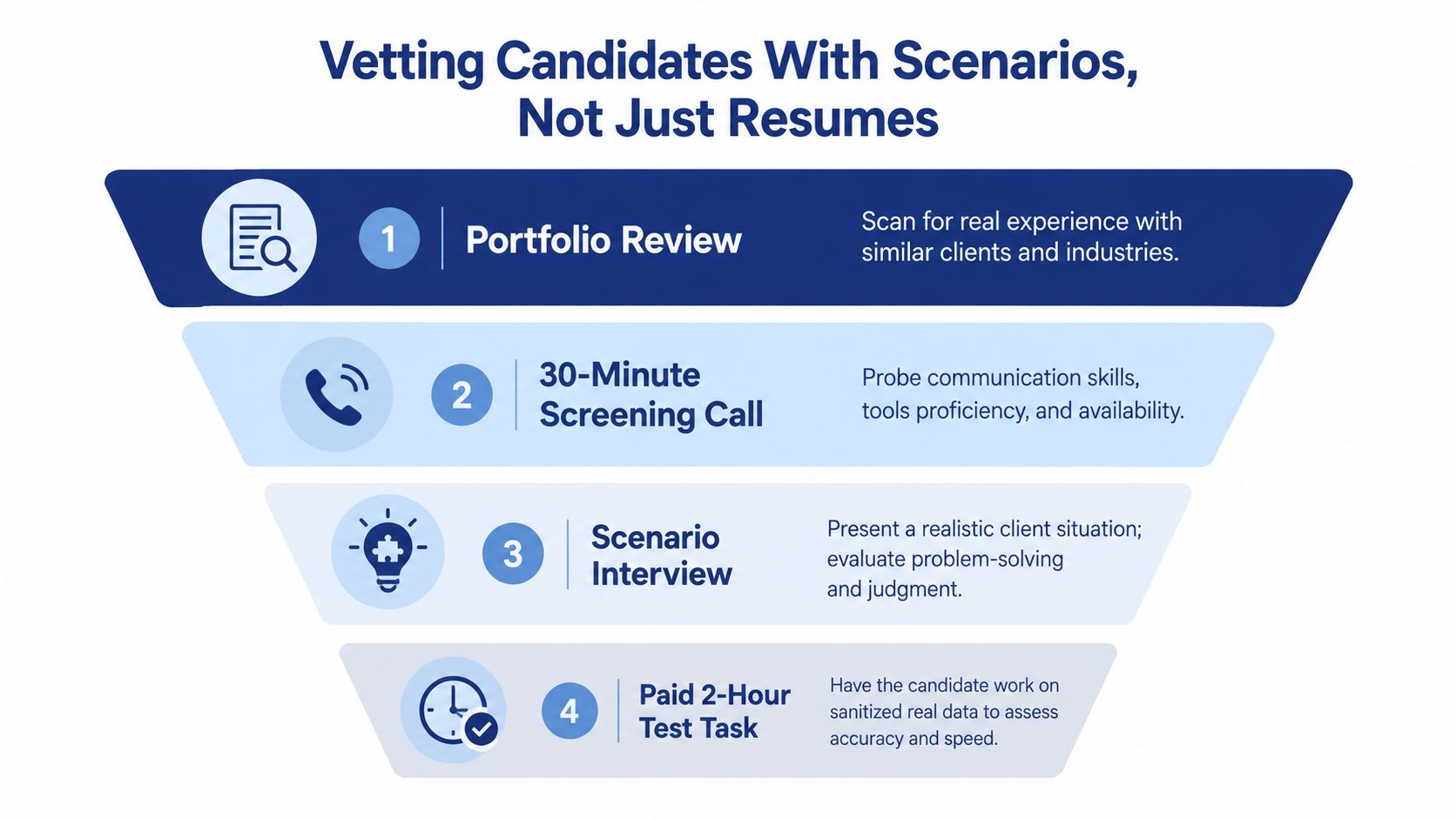
Portfolio review
Look for evidence of similar books, similar industries, and similar tools. I care less about title inflation and more about whether they've worked with the kind of mess you have.
30-minute screening call
Test communication, attention, and tool fluency. Ask short operational questions. Which reconciliations did you own? What did your weekly close packet include? How did you track unresolved items?
Scenario interview
Resume padding starts to squeak.
Paid test task
Real data. Sanitized, obviously. Two hours max.
My favorite opener is simple: walk me through the last month-end close you ran solo, including the reconciling item that worried you most. Real operators answer in sequence. Resume decorators answer in abstractions.
Then use scenario prompts:
A strong candidate won't just guess an answer. They'll talk about support, materiality, temporary treatment, comments, reviewer sign-off, and follow-up.
A good accounting assistant doesn't hide uncertainty. They surface it early, document it clearly, and keep the close moving.
Give them a small pack:
Score three things only:
If they can reconcile but can't explain a variance in plain English, that's a problem. If they write beautifully but miss obvious mismatches, that's also a problem.
If you need more interview prompts, this list of accounting interview questions is a useful starting point. Just don't stop at questions. Scenarios expose judgment. Resumes mostly expose formatting skills.
Bad onboarding is where good hires go to die.
Founders love to say, “We'll get them up to speed fast.” Translation: no SOPs, scattered passwords, half-explained workflows, and random Slack messages like “Can you just handle this one weird vendor thing?” Then everyone acts shocked when quality slips.
A remote accounting assistant needs a deliberate ramp, not osmosis.
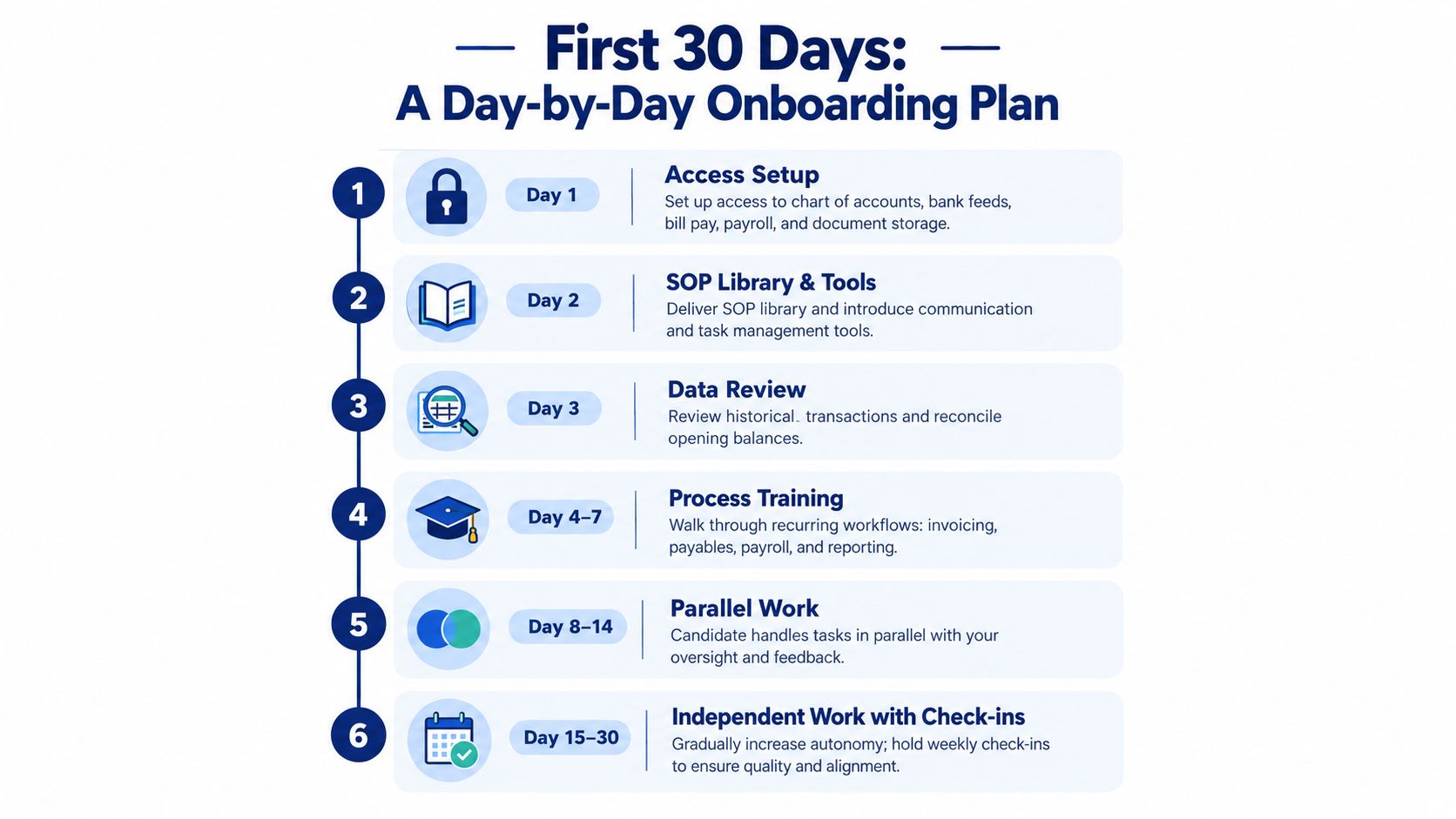
During the first three days, set up access across:
Don't dump everything in a folder and call it onboarding. Walk them through naming conventions, where approvals live, and what not to touch without review.
Days 4 through 7 should be read-only shadowing of a live close cycle or weekly workflow. Have them document every recurring judgment call they observe. That forces clarity on both sides.
By days 8 through 14, they should own one workflow under review. Bank recs. AP entry. Expense coding. Pick one lane and inspect it closely.
A lot of this mirrors what strong revenue teams do. If you've ever seen disciplined sales onboarding steps for SDR teams, the principle is the same. Clear milestones, documented process, supervised repetition, then measured autonomy.
By this stage, the assistant should own two workflows and complete the first month-end checklist with supervision. I also want a written first-month exceptions report. It should name recurring issues, missing documentation, slow approvers, and any controls that feel loose.
Use explicit approval thresholds from day one for:
If the assistant has to guess whether something needs approval, you've already designed a bad process.
The most overlooked onboarding mistake is treating remote work like a location choice instead of an operating model. In corporate accounting teams, only 10% are fully remote and 53% use a hybrid model, while 56% still use fully in-house finance and accounting teams and 42% already use consultants or outsourcing according to the 2025 Corporate Accounting Talent Study. That mix tells you the issue isn't remote versus in-house. It's how you segment work and govern handoffs.
If you need a broader framework for distributed team setup, this guide on how to onboard remote employees is a practical companion.
A remote accounting assistant fails for one reason more than any other. The work arrives as a pile, not a system.
If you let the role live inside Slack pings, email nudges, and random “can you look at this” requests, you do not have a remote accounting assistant. You have a low-cost chaos sponge. That setup always looks cheap in week one and expensive by month three.
Run the role on a fixed cadence. Protect focus. Route judgment calls into an exception lane.
Teams without a cadence either stagnate or drift into chaos.
Use a weekly operating rhythm like this:
This structure matters because the assistant should own repeatable transaction work, not improvise across five half-finished priorities. Their lane is capture, coding, matching, follow-up, and escalation. Your controller, founder, or senior accountant handles judgment calls such as unusual accruals, tax edge cases, payment disputes, and revenue treatment.
That split is what remote teams get wrong. They hire for task coverage, then ignore decision routing.
There is also evidence that well-designed remote work can perform well. A federal productivity review found that industries with greater remote-work adoption generally saw stronger total factor productivity growth, with an estimated 0.05 to 0.08 percentage-point increase for each 1 percentage-point rise in remote-work share (BLS remote-work productivity review). The lesson is simple. Remote accounting work performs when the workflow is repeatable, visible, and easy to audit.
Reviewing every transaction is lazy management disguised as quality control. It slows the team, trains the assistant to wait for approval, and turns your senior people into human checklists.
Set exception rules and review only what breaks them. A practical starting point:
Everything outside those rules should move through the standard process without drama. If your assistant needs your opinion on ordinary coding every day, the process is weak or the hire is weak. Figure out which one fast.
| KPI | Target Band | Red Flag |
|---|---|---|
| Reconciliation completion rate | All assigned recs completed on schedule | Recs routinely roll forward |
| Exception aging | Exceptions cleared within policy windows | Items sit unresolved past internal deadlines |
| AP and expense coding turnaround | Same-day or next-business-day handling for normal volume | Backlog grows and approvers lose visibility |
| Journal entry accuracy rate | Very few corrections after review | Frequent reclasses or reviewer rework |
| Uncategorized-balance days | Minimal time left uncategorized | Suspense or uncategorized balances linger |
Track these because they expose control quality, not because they look nice in a dashboard. I care less about “tasks completed” than I do about whether reconciliations close on time, exceptions get cleared, and uncategorized balances stop piling up. A $10 per hour assistant who leaves a wake of stale exceptions is more expensive than a $35 per hour assistant who keeps the books clean and the close moving.
Have the assistant mark each KPI red, yellow, or green every Friday and add one sentence of explanation for any yellow or red item.
That habit does two useful things. It forces ownership, and it shows whether the person can see risk before it turns into cleanup work. If they report green while the exception log is burning, you learned they cannot self-manage. If they report yellow early, explain the blocker clearly, and propose a fix, you probably hired someone worth keeping.
Let's talk money without pretending pricing is tidy. It isn't.
The market for remote accounting help is broad because the underlying outsourcing model is broad. Finance and accounting outsourcing is projected at $57.5 billion in 2026, with cited estimates around $56 billion to $60 billion and further expansion projected into the following years, according to finance and accounting outsourcing market research. That's why you're seeing everything from solo contractors to nearshore teams to white-glove recruiting shops.
U.S. firms commonly pay $18 to $35 per hour for an accounting virtual assistant in 2026, with full-time monthly retainers typically around $3,000 to $5,500, and one benchmark in the same source lists U.S. accounting assistant roles at $22.08 per hour on average (accounting virtual assistant salary benchmarks).
On the bookkeeping side, outsourced pricing often starts around $500 to $1,500 per month for basic work, and fuller-service packages with AP, AR, payroll coordination, and month-end close can run $1,500 to $3,500 per month (outsourced bookkeeping cost breakdown). Another pricing guide puts small-business outsourced bookkeeping at $200 to $2,500 per month, with variation based on transaction volume, account complexity, and bundled services (small-business bookkeeping pricing guide).
And yes, the offshore versus onshore split is real. Basic offshore bookkeeping is often estimated at $8 to $15 per hour, while U.S. in-house equivalents are listed at $42,000 to $60,000 annually for similar work (2026 outsourced accounting pricing breakdown). That gap is why cheap talent keeps getting attention. It's also why plenty of teams hire badly.
| Model | Typical Cost | Best For | Engagement Type | Risk Level |
|---|---|---|---|---|
| Hourly contractor | Broad range based on location and experience | Variable workload, trial periods, task-based support | Contractor | Medium, because scope can sprawl |
| Monthly retainer | Usually steadier than ad hoc hourly billing | Defined recurring workflows | Contractor or managed service | Lower if scope is tight |
| Part-time salaried or payroll arrangement | More commitment and structure | Stable recurring books with predictable weekly needs | Payroll, EOR, or local employment setup | Lower operationally, higher fixed commitment |
Use hourly when scope is still forming. Use a retainer when tasks repeat cleanly every week. Move toward payroll or a more formal arrangement when the person becomes embedded in your close and cross-functional routines.
Also, learn the economics before you commit. This overview of bookkeeping service cost helps frame what you're paying for across different support models.
Scale the role when the assistant reliably clears routine work, flags exceptions early, and reduces reviewer drag.
Swap the person out when rework becomes a pattern, communication gets slippery, or they only function when someone hovers on Zoom. That last one is more common than people admit.
Bring work back in-house when the role stops being transactional and starts leaning heavily into close management, audit prep, and planning support. At that point, you may not need “an assistant” anymore. You need an accountant, senior accountant, or controller-track operator.
The wrong move is clinging to a cheap setup that creates expensive cleanup. Low hourly rates can save money. They can also buy you a part-time mess.
If you want a remote accounting assistant without turning your finance lead into a full-time recruiter, HireAccountants helps U.S. teams find pre-vetted accounting talent for bookkeeping, AP, AR, and close support. It's a practical option when you need someone who can fit into a controlled workflow quickly, not just someone available by Monday.
Let's simplify your finances today!